Hey there, let’s cut to the chase—if you’re in the FTTH game, you already know the drop cable is the unsung hero that connects every subscriber’s home to the core network. But here’s the hard truth: even the best drop cable out there is useless if you don’t manage and maintain it like it matters. As someone who’s been in the FTTH drop cable supplier game for over a decade, I’ve seen my fair share of messy installs, botched maintenance calls, and avoidable outages that cost ISPs way more than they need to. Today, I’m breaking down exactly how to keep those drop cables running smooth—no jargon, no fluff, just real-world stuff that actually works. FTTH Drop Cable
First, let’s start with the basics: why drop cable management isn’t an afterthought. I’ve had ISPs come to me saying “our drops keep breaking” and when I walk their job sites, I see techs stapling cables to sharp siding, running them over tree branches that rub every time the wind blows, or leaving loops that get snagged by lawnmowers or construction tools. That’s not a “cable defect”—that’s lazy installation and zero proactive management. The drop cable isn’t just a wire; it’s the last mile that literally brings fiber to someone’s laptop, TV, or smart thermostat. Mess that up, and you’ve got a customer calling at 7 PM complaining their internet’s out, not just losing a support ticket—you’re losing a loyal subscriber.
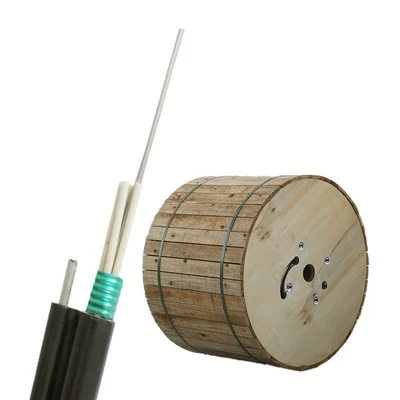
Let’s dive into installation best practices first, because if you get this right, maintenance becomes a breeze. As a supplier, I always emphasize to my clients that the right type of drop cable for the job is non-negotiable. You can’t use the same thin indoor/outdoor (IO) cable for a house that’s 50 feet back from the pole as you would for a multi-unit building with shared risers. For aerial drops, go for the self-supporting all-dielectric cable—no messenger wire to rust or snap, which cuts down on maintenance from weather damage. For underground drops, use direct-buried fiber with a waterproof outer jacket, and never skimp on the burial depth (we see so many cables cut by landscapers who didn’t know there was fiber there).
When it comes to installation, here’s the rule I teach every tech I train: “Treat the cable like it’s glass, even if it’s armored.” That means no bending it tighter than a 10-inch radius—any sharper, and you’re micro-cracking the fiber inside, which will cause intermittent outages that are a nightmare to troubleshoot. I’ve had customers swear their internet works when it feels like it, but drops when it’s raining, only to find a hidden micro-crack from a bad bend. Also, don’t over-staple or over-tighten the cable. I’ve seen techs pulling so tight that when the house shifts in the wind, the cable pulls at the splice point inside the wall. Leave a little slack—like 1 to 2 feet at the pole and the house entry point—so the cable has room to move without stress.
Now, aerial drop management specifically—this is where 60% of maintenance issues come from. Weather is the big enemy here: heavy snow, ice, wind, even extreme heat that makes cables expand and contract. Last winter, we had a client in Minnesota call us panicking because 20% of their aerial drops were down after an ice storm. When we checked, the problem wasn’t the cable itself—it was the slack left at the pole was too short, so when ice added weight, the cable pulled free from the anchor. The fix? Every aerial drop should have an anchor point every 150 feet, not just at the pole, and slack should be coiled neatly (never twisted) at the anchor to take tension off the ends. Also, trim tree branches that cross or rub against aerial lines—don’t just cut them once. Do a walkthrough twice a year, before winter and after fall, because new growth or storm damage can cause rubs that wear through the jacket in a matter of months.
Indoor drops are another hot spot. I’ve seen techs running cables along baseboards where people vacuum, behind furniture, or through doorframes that pinch the cable every time the door closes. Indoor drops should be run along wall studs, through ceiling cavities, or using wireless mounts that keep them away from foot traffic and sharp edges. If you have to run a cable across a floor, use a low-profile cable cover that’s glued down or taped securely—no one wants a tripping hazard, and no one wants to replace a cable that’s been chewed by a pet or run over by a chair. Also, at the home entry point, use a weatherproof sealant (not just duct tape, which falls off) to keep moisture out—moisture is the #1 cause of fiber degradation in indoor and outdoor cables alike.
Now, proactive maintenance—this is the secret sauce that keeps you from dealing with 10 outage calls a day. Too many ISPs only check their drop cables when there’s a problem. That’s like waiting for your car to break down before you change the oil. So what does proactive maintenance actually look like? First, do quarterly visual inspections of aerial drops. You don’t need a bucket truck every time—send a tech with binoculars to check for sagging cables, frayed jackets, broken anchors, or tree rubs. For underground drops, use a cable locator every time you dig near a utility line (not just your own—confirm with 811 before you send anyone out, even if you think you marked the lines). We’ve had a client accidentally dig up 3 of their own underground drops because they assumed the locator was working, and that cost them $15k in service calls and lost subscribers.
Then there’s testing—don’t skip this. When you install a new drop cable, do a light loss test right there on the job site. I always tell my clients: if the test shows more than 0.5 dB of loss, fix it before you leave. That 0.5 dB might not seem like much, but over time, that’s a gradual signal loss that will cause slow internet or intermittent outages that no amount of router troubleshooting will fix. For existing cables, do annual OTDR (Optical Time Domain Reflectometer) tests. An OTDR will show you exactly where micro-cracks, splice issues, or breaks are—even if you can’t see them with a visual inspection. Last year, a client used an OTDR to find a micro-crack in a drop cable that was buried under a garden, and fixed it before the subscriber even noticed a problem. That’s the kind of maintenance that keeps customers happy.
What about common issues and how to fix them fast? Let’s talk about snagged cables—lawnmowers, construction tools, even squirrels chewing through jackets. If the cable jacket is damaged but the fiber inside is fine, you can splice it with a mechanical splice (no need to re-run the whole drop, which saves time and money). If the fiber is broken, you’ll need to pull a new section, but here’s a pro tip: keep a stock of pre-terminated drop cables on hand for emergencies. My company ships them next-day to most of our clients, so they don’t have to wait days for a reel of cable when a storm hits. For intermittent outages, always check the splice points first—most of the time, that’s where the signal is dropping in and out, not the cable itself.
Another thing I see all the time: overusing old or damaged hardware. Anchors, staples, junction boxes—all that stuff wears out. If your aerial drop anchors are rusted, replace them with stainless steel ones. If your indoor staples are sharp, use plastic staples that won’t pierce the cable jacket. Junction boxes should be sealed with silicone, not just plastic lids, to keep water and bugs out. We’ve had a client in Florida have issues with junction boxes that were sealed with tape—after a year, the tape fell off, and humidity got in, corroding the splices. Switching to silicone-sealed boxes cut their maintenance calls for junction-related issues by 80%.
Now, let’s get into mistakes I see even experienced ISPs make. First, not training techs properly. A new tech might think “stapling a cable tight is fine” until they learn that 6 months later, that tight staple will wear through the jacket. We offer free training to all our clients’ techs—because even if you buy the best drop cable from us, if your techs don’t know how to install it right, it’s a waste. Second, ignoring manufacturer guidelines. Every drop cable we sell has specific bend radius, tension, and burial depth requirements. I’ve had ISPs argue with me that “our old installers did it this way for years” and wonder why their cables are failing early. Those guidelines are there for a reason—fiber is delicate, even when it’s in a tough jacket. Third, not documenting your drops. If you don’t write down where each drop is, where it’s anchored, and when it was tested, you’re going to waste hours looking for a break when there’s an outage. A simple spreadsheet or a map in your work order system is enough to keep track—no fancy software needed.
As a drop cable supplier, I also think it’s important to mention that the cable you choose plays a big role in maintenance costs. Cheap drop cables with thin jackets will wear out in 3-5 years, while high-quality cables with UV-resistant, crush-resistant jackets will last 10-15 years. That’s not a sales pitch—do the math: if you spend $0.50 less per foot on a cheap cable, but have to replace it every 4 years, that’s $1.25 per foot over 10 years, vs. $1 per foot for a quality cable that lasts 10 years. The cheap one costs you more long-term. We test all our drop cables for extreme weather, crush, and UV resistance, and we back them with a 15-year warranty because we stand behind our product.
Now, let’s wrap this up with a quick checklist that you can start using tomorrow, no matter what size your FTTH network is. First, during installation: pick the right cable for the location, leave enough slack, avoid sharp bends, seal entry points, do a light loss test before leaving. Second, proactive maintenance: inspect aerial drops twice a year, do quarterly visual checks, use an OTDR annually, confirm all anchors and hardware are in good shape. Third, emergency fixes: keep pre-terminated cables on hand, fix minor jacket damage with mechanical splices, test after every repair. Fourth, ongoing: train your techs, document every drop, don’t skip manufacturer guidelines.
At the end of the day, managing and maintaining FTTH drop cables isn’t rocket science—it’s about being proactive, paying attention to details, and not cutting corners. I’ve seen so many ISPs grow their subscriber base fast, only to hit a wall with maintenance costs because they skimped on cable and training. If you get this right, you’ll have fewer outage calls, happier customers, and lower long-term costs.

If you’re dealing with high drop cable failure rates, or you’re looking for a reliable supplier that can help you pick the right cable for your network, we’re here to chat. We work with ISPs of all sizes, from small local companies to large regional networks, and we can provide product samples, training, and customized solutions to fit your needs. Reach out to us to discuss how we can help you streamline your drop cable management and reduce maintenance headaches.
GYDTA REFERENCES
- Fiber Broadband Association. FTTH Deployment Best Practices: Drop Cable Installation and Maintenance. 2022.
- Telecommunications Industry Association (TIA). TIA-568-C.3: Standard for Optical Fiber Cabling Components. 2021.
- National Electrical Manufacturers Association (NEMA). NEMA WD 6: Standard for Wire and Cable Marking. 2020.
- Federal Communications Commission (FCC). Broadband Infrastructure Deployment Guidelines for Drop Cables. 2023.
- International Society of Automation (ISA). ISA-100: Wireless Systems for Industrial Automation, relevant to outdoor utility cable management. 2022.
Guangdong Shengtang Optical Cable Communication Equipment Co., Ltd.
As one of the most professional ftth drop cable manufacturers and suppliers in China, we’re featured by quality products and good price. Please rest assured to buy bulk durable ftth drop cable in stock here from our factory. Customized orders are welcome.
Address: The 6th floor of Building B3, located on the south side of Jingyi Road, Shiwan Town, Boluo County, Huizhou City, Guangdong Province.
E-mail: gdshengtang@gmail.com
WebSite: https://www.gdstcable.com/
